

Build No-Code WhatsApp Chatbot Flows in Minutes
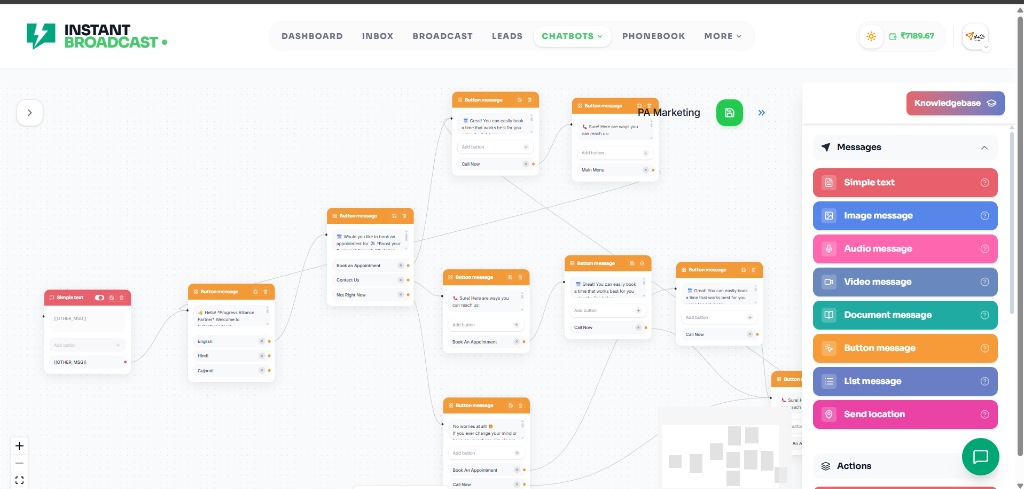
Design interactive conversation paths, automated keyword responses, and rich button menus with an intuitive visual drag-and-drop canvas.
Why Use Visual Chatbot Flows?
Replace complex manual replies with an automated visual canvas that engages and converts visitors automatically.
Without Chatbot Flows
- Manual typing to answer routine and repetitive customer questions
- Slow lead qualification leading to lost sales opportunities
- Rigid text-only menus with high user drop-off rates
- No structured branching or conditional logic for varied user intents
- Clunky, disjointed handoff between automation and live agents
With Chatbot Flows
- Instant 24/7 automated responses to customer inquiries
- Automated qualification gathering names, emails, and purchase intents
- Interactive button & list message menus for effortless user navigation
- Visual branching logic, conditions, variables & delay timers
- Seamless 1-click routing and handoff to human support agents
Key Capabilities of Our Flow Canvas
Everything you need to automate conversations, capture leads, and support customers seamlessly.
Drag & Drop Canvas
Connect message cards, questions, delays, and action nodes with a fluid visual flow builder.
Buttons & List Menus
Send WhatsApp interactive Quick Reply buttons and structured list pickers for higher click-throughs.
Keyword & Intent Matching
Trigger specific chatbot flows when customers send exact keywords, phrases, or regex patterns.
Custom User Attributes
Collect user inputs like email, location, or order numbers and save them directly to CRM custom fields.
Webhook & API Nodes
Fetch live data from external CRMs, order tracking systems, and payment gateways in real-time.
Smart Human Agent Handoff
Transfer live conversations to the right support department or agent based on user responses.
How Chatbot Flows Work
Build, test, and deploy automated conversation workflows in 4 easy steps.
1. Define Triggers
Choose keywords, broadcast buttons, or welcome events that start the chatbot flow.
2. Map Conversation Nodes
Drag and drop message nodes, interactive button menus, questions, and conditional branches.
3. Test in Live Preview
Simulate the conversation flow directly inside the editor to verify branching logic.
4. Deploy Instantly
Publish your flow to your verified WhatsApp Business number in 1 click.
Frequently Asked Questions About Chatbot Flows
Clear answers to help you get started with WhatsApp flow automation.
Start Automating WhatsApp Conversations Today
Build your first visual chatbot flow in under 5 minutes with Instant Broadcast.